Nimbo DMs
Opens PostNimbo and walks you through it on your own account.
At a glance
Section titled “At a glance”Nimbo DMs is PostNimbo’s inbox, under Engage. Comments, replies and reviews from your channels arrive in one place, and so do direct messages once they’re on for your workspace. On the way in, topics tag them and automations can reply, assign or tidy them up, so the inbox only holds what needs a person.
Find your way in Nimbo DMs
Section titled “Find your way in Nimbo DMs”Open Engage in the top bar. It has four tabs: Inbox (with the number of open conversations), Contacts, Automations and Settings.
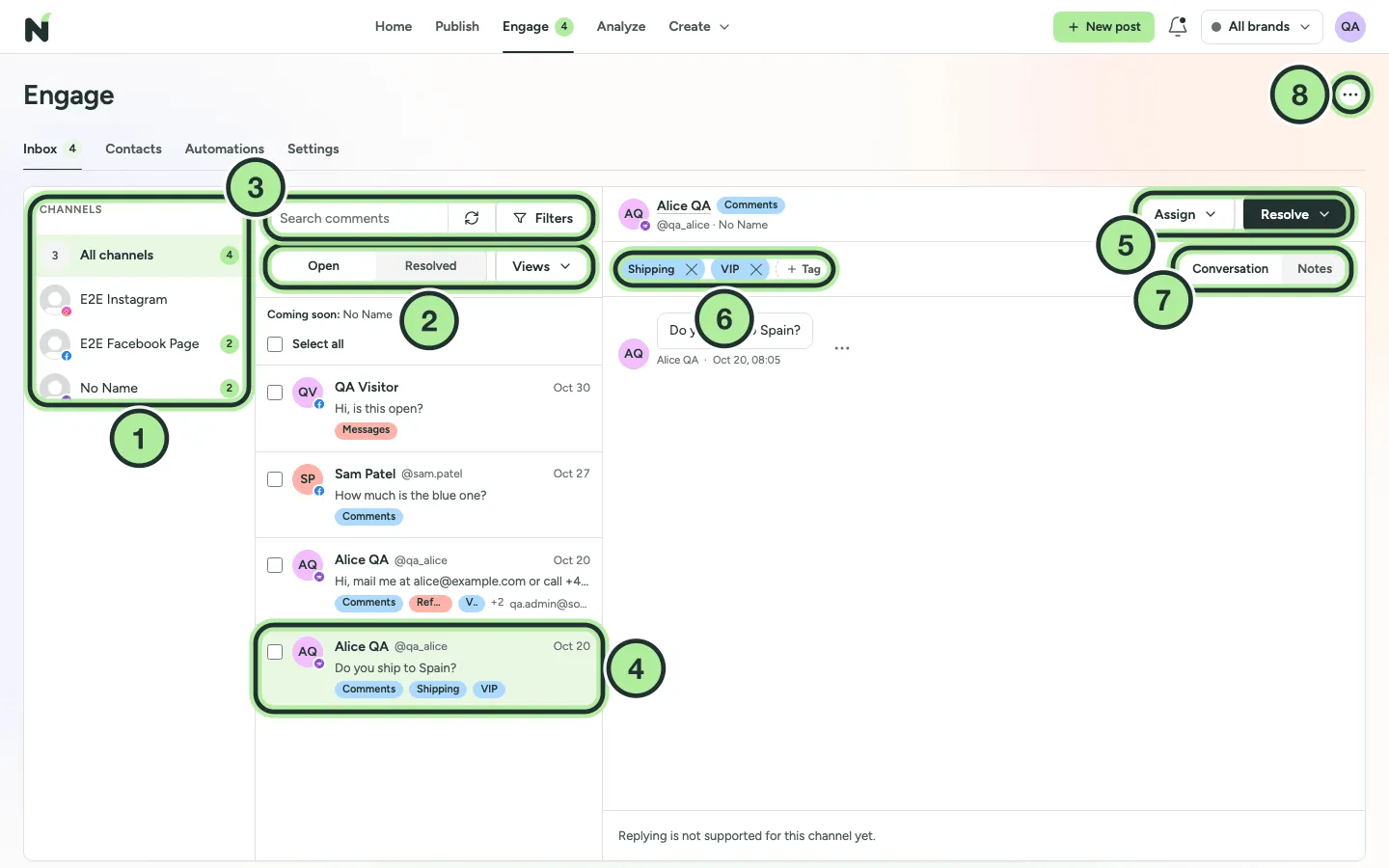
- Channels. Pick one to see only its conversations, or All channels.
- Open / Resolved and saved Views.
- Search comments, Sync now and Filters.
- The conversation list. The selected conversation is highlighted.
- Assign and Resolve.
- The conversation’s tags. Select Tag to add one.
- Conversation and internal Notes.
- ⋯ (More actions): Sync now and Export CSV.
The brand switcher in the top bar decides which brands’ channels you see.
Filter the list
Section titled “Filter the list”- Open / Resolved: open conversations are shown by default.
- Select Filters for:
- Search comments: search by text or author.
- Views: save the current filters as a view (for example “Unanswered comments”) and open it again in one click.
Use the arrow keys to move between conversations. Tick conversations (or Select all) to Resolve or Reopen several at once.
Which networks are supported
Section titled “Which networks are supported”| Network | What arrives | Reply | Like | Hide | Delete |
|---|---|---|---|---|---|
| Facebook Page | Comments | Yes | Yes | Yes | Yes |
| Comments | Yes | Yes (Meta Business Suite connection) | Yes | Yes | |
| Threads | Replies | Yes | No | Yes | No |
| YouTube | Comments | Yes | No | No | Yes |
| Google Business Profile | Reviews | Yes | No | No | Your reply only |
| Trustpilot | Reviews | Yes | No | No | Your reply only |
Trustpilot needs your own Trustpilot API key (see Your API keys). X, personal LinkedIn profiles, Pinterest and other networks don’t show in Nimbo DMs.
How often new messages arrive
Section titled “How often new messages arrive”PostNimbo checks for new messages every 10 minutes. Many Facebook and Instagram comments arrive straight away. Select Sync now to check right away. The first time a channel syncs, it loads the last 7 days.
Direct messages
Section titled “Direct messages”Answer comments and comment replies from Instagram and Facebook right here, next to your YouTube comments, Threads replies and reviews, so nothing waits in a separate app.
Instagram, Facebook and WhatsApp direct messages arrive in this same inbox. They turn on for your workspace as soon as Meta approves our messaging access. Then an admin turns them on for each channel:
-
In Engage, select the WhatsApp channel on the left.
-
Turn on Direct messages.
-
New messages show up as they arrive. If the status under the switch shows a problem, for example a permission that needs the channel to be reconnected, follow what it says.
Messages appear as type Messages. Photos, videos, voice notes and files people send show in the thread.
Block or report someone
Section titled “Block or report someone”Deal with spam and abuse from the conversation itself, without hunting for the comment on the network. Open ⋯ (Message actions) on a message someone else wrote:
- Block: where the network allows it, for example Facebook Pages and YouTube, PostNimbo blocks the person through the network after you confirm. They can’t comment on or message that channel any more, and you can unblock them on the network.
- Block on Instagram (or the network’s name): elsewhere, this opens their profile on the network, where you block them in a couple of taps.
- Report on Instagram (or the network’s name): opens the message on the network, or the person’s profile there, so you can report it with the network’s own tools. Where there’s no link, the menu tells you to use the network’s report option on the message.
Report opens the network’s own report page, and nothing leaves your workspace. Reviews can be reported but not blocked.
Blocking needs the Full or Publish level on the channel, like hiding and deleting. Members with View only or Reply only see Report only.
A channel needs reconnecting
Section titled “A channel needs reconnecting”A red banner (Some channels need to be reconnected to load new comments) means the network stopped giving PostNimbo access. See Channel needs reconnecting.