Links and UTM tags
UTM parameters (utm_source, utm_medium and so on) tell your website analytics where a visit came from. PostNimbo can add them to every link in your posts, so you don’t have to tag links by hand.
Set it up
Section titled “Set it up”-
Go to Settings → Links & UTM (admins).
-
Turn on Add UTM parameters to links.
-
Fill in the values. Use placeholders so each post gets the right value, and leave a field empty to leave that parameter out.
-
Add any Excluded domains, one per line.
-
Select Save.
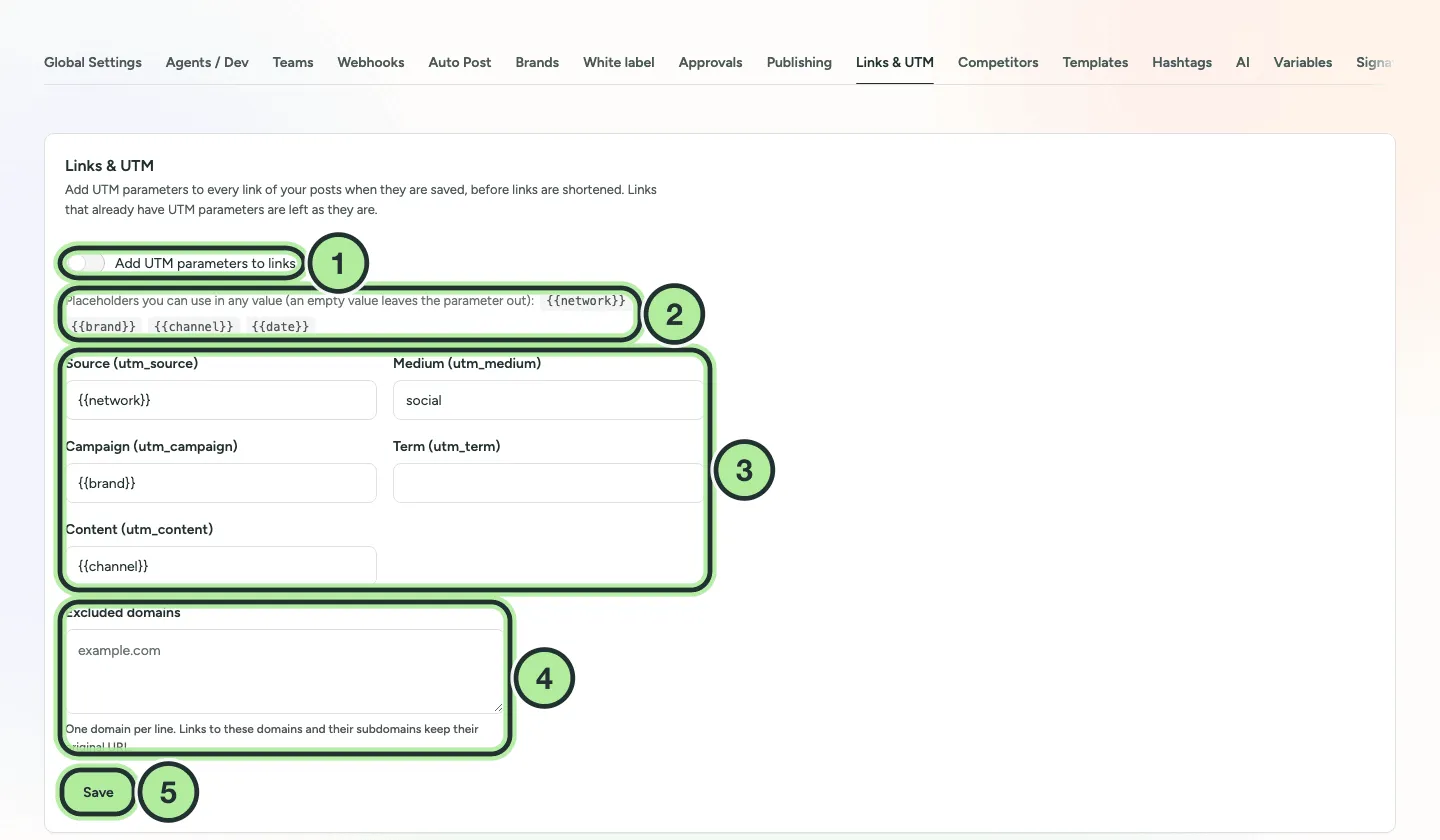
- Add UTM parameters to links.
- Placeholders:
{{network}},{{brand}},{{channel}}and{{date}}. - Source, Medium, Campaign, Term and Content.
- Excluded domains: links to these domains and their subdomains keep their original URL.
- Save.
Under the settings, Preview shows the link a channel would get: paste a link and pick a channel.
When tags are added
Section titled “When tags are added”Tags are added when the post is saved, before links are shortened, so a short link points to the tagged URL.
- Links that already have UTM parameters are left as they are.
- Channels that remove links from posts get neither tags nor short links.
- Short links follow the Shortlink Preference in Settings → Global Settings: Ask every time, Always shortlink or Never shortlink.