Brands
A brand is a workspace inside your account: its own channels, posts, team members, timezone and settings. Agencies usually create one brand per client.
Create a brand
Section titled “Create a brand”-
Open the brand switcher in the top bar and select Manage brands (or go to Settings → Brands).
-
Add a brand and fill in Details: name, description, colour, logo URL, timezone and default language.
-
Under Channels, select Connect channel to add channels straight to this brand, or move existing ones in.
-
Under Members, add teammates and give each a brand role. See Invite your team.
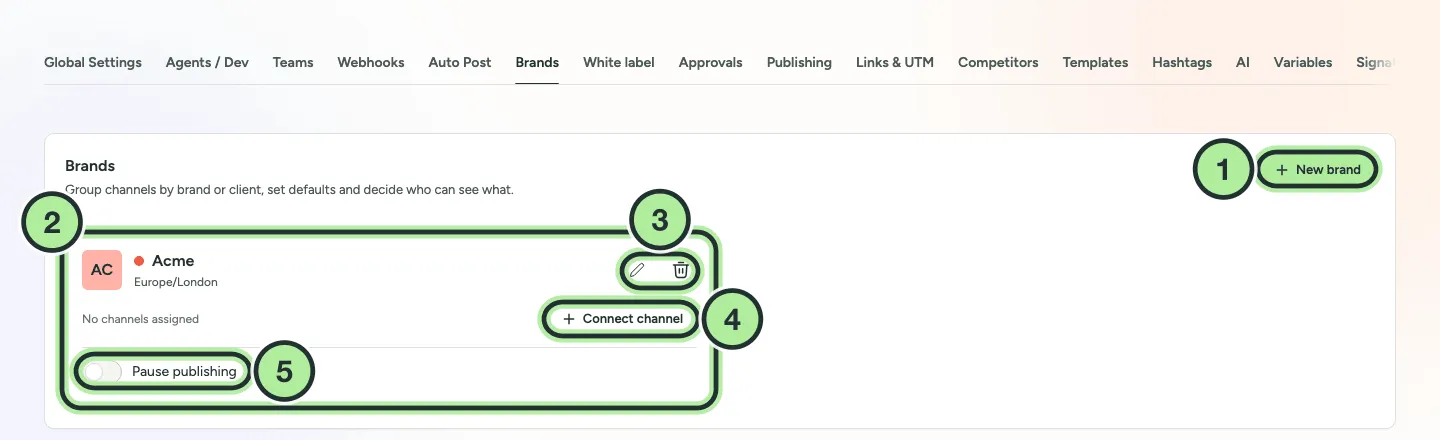
- New brand.
- A brand, with its colour, timezone and channels.
- Edit or delete the brand.
- Connect channel straight to this brand.
- Pause publishing for the whole brand.
Switch between brands
Section titled “Switch between brands”Use the brand switcher in the top bar. Pick one brand to see only its channels, posts, inbox and analytics, or All brands to see everything you have access to.
When a brand is selected, new channels and new posts go to that brand. The composer shows Posting as … so you always know which brand you’re working in.
Move a channel to another brand
Section titled “Move a channel to another brand”Open the channel’s ⋯ menu and choose Move / add to group, then pick the brand (or Remove from customer).
Pause a whole brand
Section titled “Pause a whole brand”In Settings → Brands, select Pause publishing on a brand to hold all of its scheduled posts. See Pause publishing.