Competitors
Add a competitor
Section titled “Add a competitor”-
Go to Settings → Competitors (or Analyze → Competitors → Manage competitors).
-
Choose a Channel of yours on the same network.
-
Enter the competitor’s Handle.
-
Select Add competitor.
Supported networks: Instagram, X, YouTube, Bluesky and Mastodon. You can track up to 20 competitors per workspace.
Compare
Section titled “Compare”Go to Analyze → Competitors and pick 7, 30 or 90 days and a brand. The table shows you and each competitor side by side:
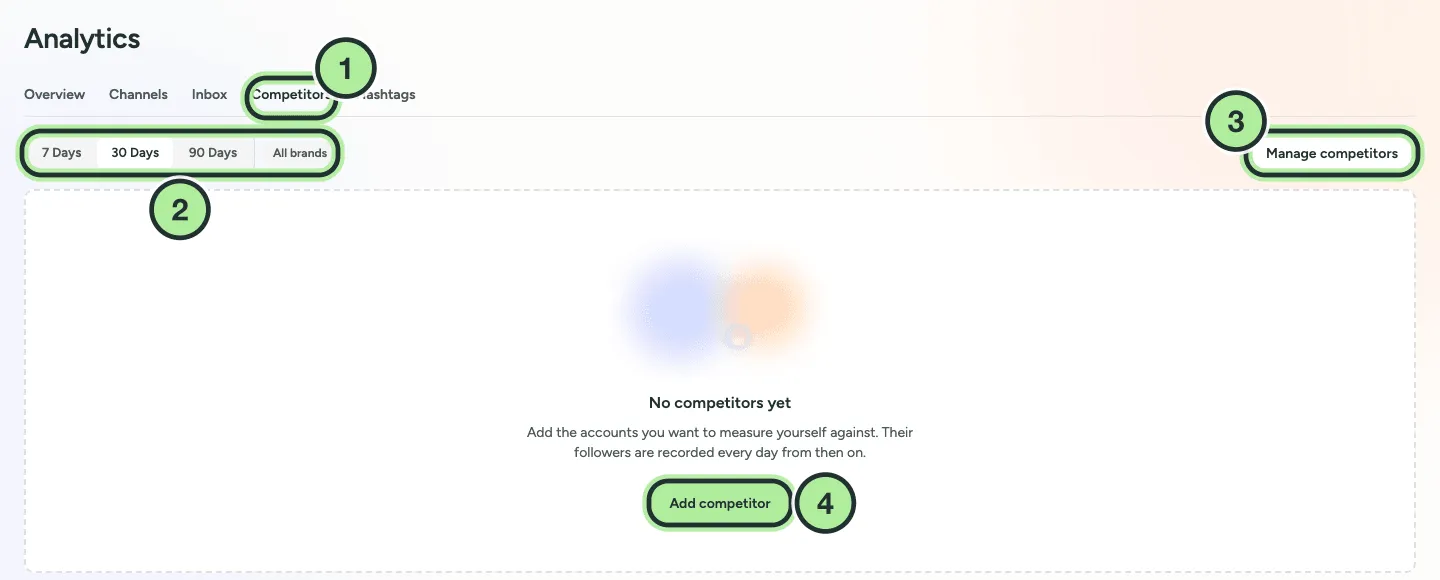
- Competitors tab.
- The period and the brand.
- Manage competitors opens the settings.
- Add competitor, shown until you track someone.
- Followers and Change
- Posts / week
- Engagement rate: average likes, comments and shares per post, divided by followers
- Trend
Competitor numbers are recorded once a day. Select Refresh on a competitor in Settings to update it now.