Failed posts and automatic retries
When a network rejects a post, it’s marked as failed in the calendar and you’re notified (bell, and email if Failure Emails is on). Open the post to see the network’s reason.
Retry automatically
Section titled “Retry automatically”-
Go to Settings → Publishing (admins).
-
Set Retry failed posts to Once, 2, 3 or 5 times.
-
Set Wait between retries (5 minutes up to 24 hours).
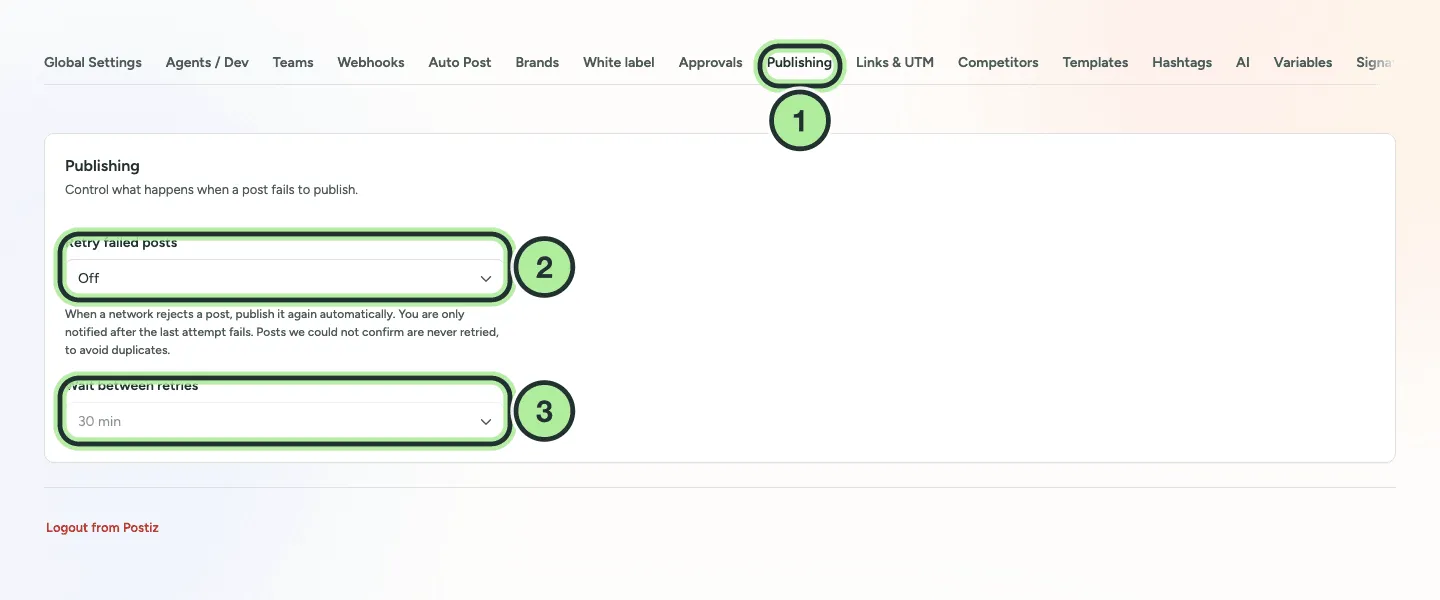
- Settings → Publishing.
- Retry failed posts.
- Wait between retries.
You’re notified once, after the last attempt fails.
Fix and retry by hand
Section titled “Fix and retry by hand”-
Open the failed post.
-
Fix what the error message says (text too long, wrong image size, missing permission).
-
Pick a new time and save, or use Post Now.
For what common errors mean, see Post failed.