Find your way around
The top bar is the same on every page. Home is where you land after signing in.
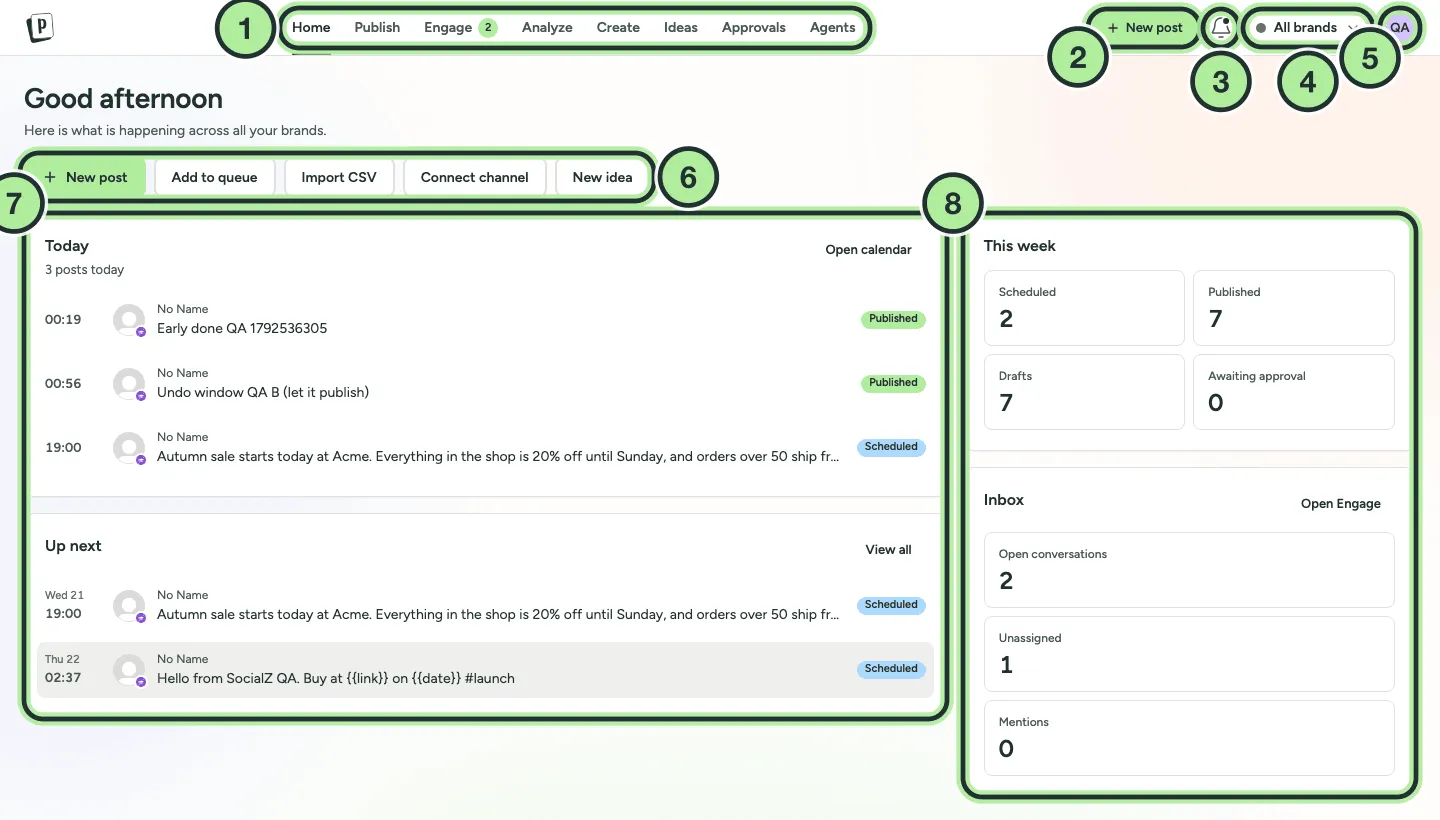
- The top bar tabs (see the table below).
- New post opens the composer from anywhere.
- The notifications bell. Reminders and publishing problems show up here.
- The brand switcher. Pick a brand to see only its channels and posts, or All brands. See Brands.
- The account menu (your avatar): Settings, Billing (admins), theme, language and Log out.
- Quick actions: New post, Add to queue, Import CSV, Connect channel and New idea.
- Today and Up next: your posts, with their status.
- This week (scheduled, published, drafts, awaiting approval) and the Inbox summary.
| Tab | What you do there |
|---|---|
| Publish | Calendar (Day, Week, Month), Queue and Reminders. Create, schedule, import and export posts. |
| Engage | One inbox for comments, mentions, messages and reviews, plus Automations and inbox Settings. |
| Analyze | Overview KPIs, Channels, Inbox reports, Competitors and Hashtags. |
| Create | Your media library: uploads, folders, the photo editor and video trim. |
| Ideas | A simple board to collect post ideas and turn them into posts. |
| Approvals | Posts waiting for review (shows a count when something is pending). |
| Agents | The built-in AI assistant. |