Publish via reminder
Some things can’t be posted through a network’s API, for example an Instagram Reel with trending audio. For those, schedule a reminder: PostNimbo tells you when it’s time, and you post it from the network’s own app.
Schedule a reminder
Section titled “Schedule a reminder”-
Create your post as usual, with the caption and media.
-
Under How to publish, choose Remind me to post instead of Publish automatically.
-
Pick the date and time and save.

- Remind me to post.
- What happens at the scheduled time.
- The time you’ll be reminded.
- Add to Calendar saves it.
The post shows a reminder badge in the calendar.
When it’s time
Section titled “When it’s time”You get an in-app notification (the bell) titled Time to post on …, and an email if your workspace sends email. Then:
-
Go to Publish → Reminders (the bell icon on phones). The post is under Waiting for you.
-
Select Copy caption and Download media.
-
Post it in the network’s app.
-
Back in PostNimbo, select Mark as posted. Optionally paste the Link to the post (it must start with https://).
Missed it? Select Resend reminder.
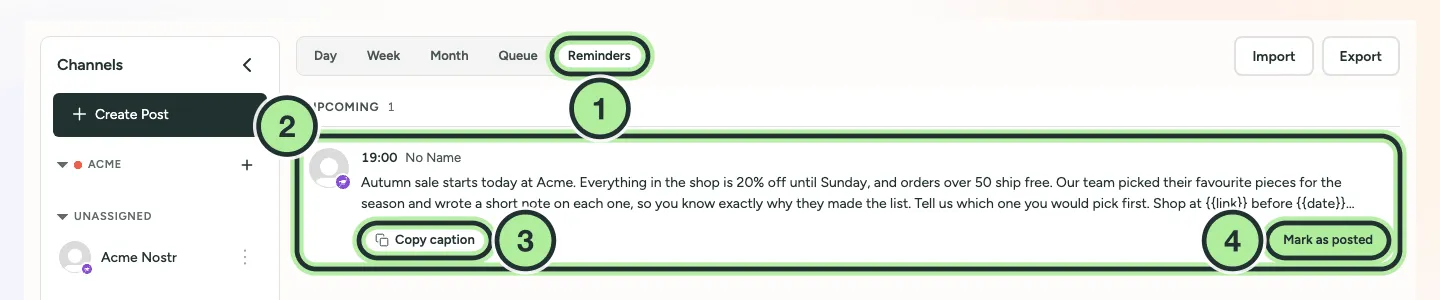
- Reminders view.
- A reminder. Reminders due within a day show under Upcoming until it’s time.
- Copy caption (and Download media when the post has media).
- Mark as posted once it’s live.
When to use a reminder
Section titled “When to use a reminder”Use a reminder for anything the network’s API doesn’t support, such as:
- Instagram Reels with trending audio.
- Story stickers, link stickers and polls on Instagram Stories.
- YouTube Community posts, LinkedIn articles and Facebook polls.
- A channel whose posting access isn’t approved yet.