The inbox
At a glance
Section titled “At a glance”Comments, mentions, direct messages and reviews from your channels arrive in one inbox. On the way in, topics tag them and automations can reply, assign or tidy them up, so the inbox only holds what needs a person.
Find your way in the inbox
Section titled “Find your way in the inbox”Open Engage in the top bar. The Inbox tab shows how many conversations are open.
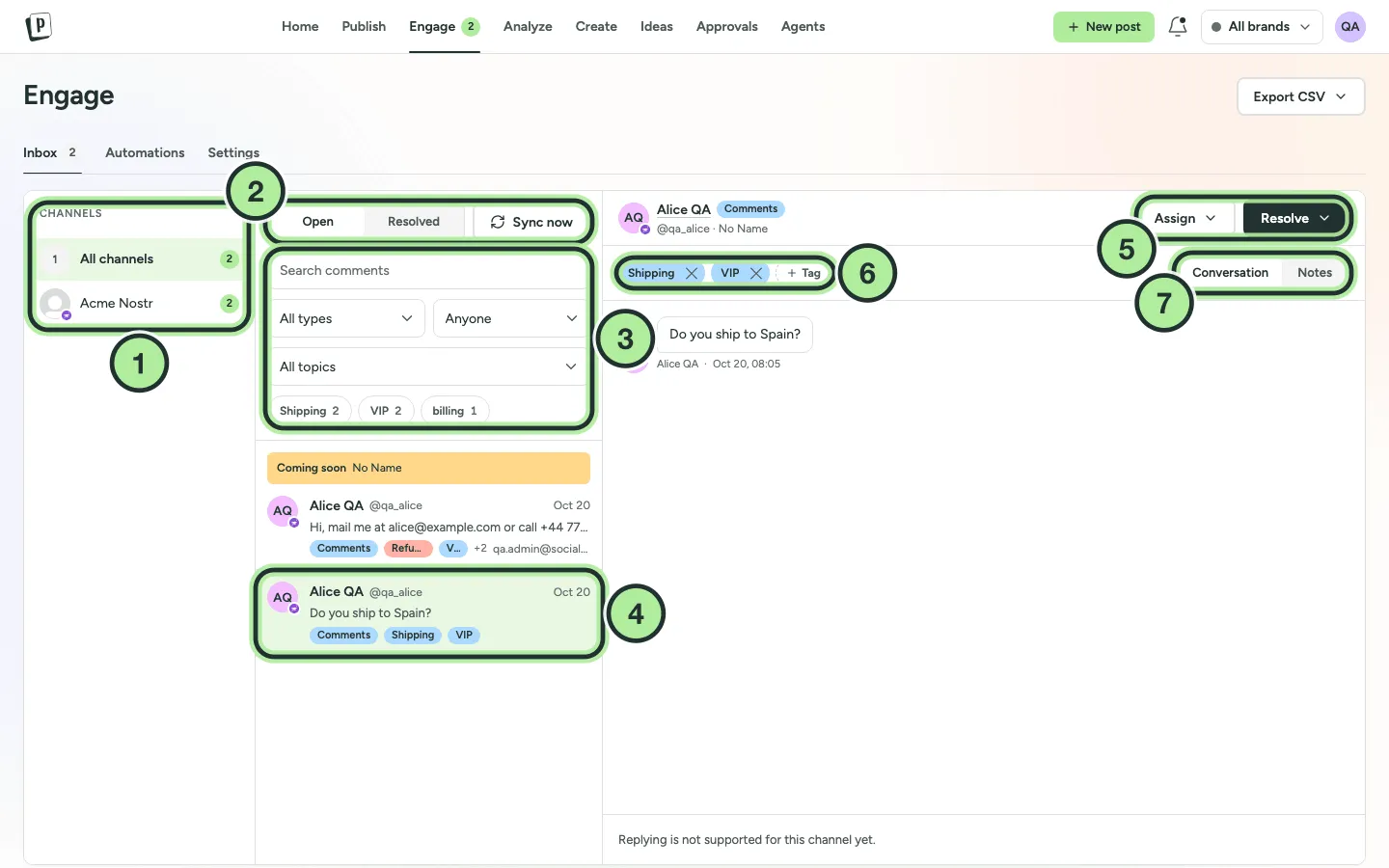
- Channels. Pick one to see only its conversations, or All channels.
- Open / Resolved and Sync now.
- Search and filters: type, assignee, topic and tags.
- The conversation list. The selected conversation is highlighted.
- Assign and Resolve.
- The conversation’s tags. Select + Tag to add one.
- Conversation and internal Notes.
The brand switcher in the top bar decides which brands’ channels you see.
Filter the list
Section titled “Filter the list”- Open / Resolved (2): open conversations are shown by default.
- Type: Comment, Reply, Mention, Message (direct messages) or Review.
- Assignee: Anyone, Assigned to me or Unassigned.
- Topic and tags: once you’ve created them. See Topics.
- Search comments: search by text or author.
Use the arrow keys to move between conversations.
Which networks are supported
Section titled “Which networks are supported”| Network | What arrives | Reply | Hide | Delete |
|---|---|---|---|---|
| Facebook Page | Comments, messages* | Yes | Yes | Yes |
| Instagram (both kinds) | Comments, messages* | Yes | Yes | Yes |
| Threads | Replies | Yes | Yes | No |
| YouTube | Comments | Yes | No | Yes |
| LinkedIn Page | Comments | Yes | No | No |
| X | Mentions and replies | Yes | No | No |
| Google Business | Reviews | Yes | No | Your reply only |
| TikTok (Business connection) | Comments | Yes | No | Your own comments |
* Messages need to be switched on per channel. See below.
Not supported yet: personal LinkedIn profiles, the regular Tiktok connection, Pinterest and other networks. These show Coming soon.
How often new messages arrive
Section titled “How often new messages arrive”PostNimbo checks for new messages every 10 minutes. Select Sync now to check right away. The first time a channel syncs, it loads the last 7 days.
Direct messages
Section titled “Direct messages”For Facebook Pages and Instagram, admins can turn on direct messages per channel.
-
In Engage, select the channel on the left.
-
Turn on Direct messages.
-
Wait for the first sync. The status shows if anything is missing, for example a permission that needs the channel to be reconnected.
Messages appear as type Message. Photos and files people send are shown in the thread.
Google reviews
Section titled “Google reviews”Reviews of your Google Business locations show as type Review, with the star rating in the thread header. You can reply publicly. Reviews themselves can’t be hidden or deleted.
A channel needs reconnecting
Section titled “A channel needs reconnecting”A red banner (Some channels need to be reconnected to load new comments) means the network stopped giving PostNimbo access. See Channel needs reconnecting.